Code Structure
Open a new FRC VS Code window and press Ctrl+Shift+P. Select WPILib: Create a New Project, then use these options:
Project type: Template
Language: Java
Project base: Command Robot

Base folder: choose where to save the project
Project name: enter a descriptive name

Team number: 1114 (replace this with your team number)
After WPILib generates the project, its files appear in the VS Code File Explorer:
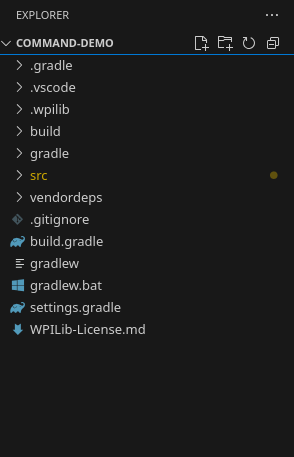
Here is the full view:
project-name/
├── .gradle/
├── .vscode/
├── .wpilib/
├── build/
├── gradle/
├── src/
│   └── main/
│       ├── deploy/
│       └── java/
│           └── frc/
│               └── robot/
│                   ├── Main.java
│                   ├── Robot.java
│                   ├── RobotContainer.java
│                   ├── Constants.java
│                   ├── commands/
│                   └── subsystems/
├── vendordeps/
├── .gitignore
├── build.gradle
├── gradlew
├── gradlew.bat
├── settings.gradle
└── WPILib-License.md
The project may look complicated at first. For now, focus on src/main/java/frc/robot, which contains Main.java, Robot.java, RobotContainer.java, and Constants.java, along with the commands/ and subsystems/ folders.
Main.java
This is the entry point of your robot code. Robot::new is a constructor reference that works the same way as:
RobotBase.startRobot(() -> new Robot());
Main.javaYou generally do not need to edit Main.java.
Robot.java
This file defines what the robot does during each mode and constructs RobotContainer.
In a command-based robot, the command scheduler must run periodically—normally every 20 ms—to manage commands and subsystem methods:
@Override
  public void robotPeriodic() {
    // Runs the Scheduler.  This is responsible for polling buttons, adding newly-scheduled
    // commands, running already-scheduled commands, removing finished or interrupted commands,
    // and running subsystem periodic() methods.  This must be called from the robot's periodic
    // block in order for anything in the Command-based framework to work.
    CommandScheduler.getInstance().run();
  }
When autonomous mode begins, the robot schedules the autonomous command selected through RobotContainer:
@Override
  public void autonomousInit() {
    m_autonomousCommand = m_robotContainer.getAutonomousCommand();

    // schedule the autonomous command (example)
    if (m_autonomousCommand != null) {
      CommandScheduler.getInstance().schedule(m_autonomousCommand);
    }
  }
RobotContainer.java
The robot's subsystems, commands, and controller bindings should be declared here:
private final IntakeSubsystem intake = new IntakeSubsystem();

...

private void configureBindings() {
  // Run the intake command while the Xbox controller's A button is held.
  m_driverController.a().whileTrue(new IntakeCommand(intake));
}
onTrue and whileTrueUse onTrue for an action that should start once when a button is pressed. Use whileTrue for an action that should run only while a button is held. In this example, releasing the A button cancels IntakeCommand, so its end() method stops the motor.
Constants.java
If you need a refresher, see Variables vs. Constants.
The Constants.java class stores shared values such as controller ports and current limits. In the template project, one example is kDriverControllerPort.
Subsystems
The subsystems/ folder contains code for robot mechanisms such as the drivetrain, intake, arm, or elevator. A subsystem manages its motors, sensors, and basic actions. See the Subsystems page for more details.
Commands
The commands/ folder contains commands that tell one or more subsystems what actions to perform. For example, a command could move an elevator to a set height or run an intake until it detects a game piece.
See the Commands page for more details.
Other files
.gradle/stores Gradle's local cache and project data. You normally do not edit it..vscode/contains VS Code settings for the project..wpilib/stores WPILib project settings and version information.build/contains files generated when the robot code is compiled. It can be recreated automatically.gradle/contains the Gradle Wrapper files used to build the project with the correct Gradle version.src/main/deploy/contains files that should be copied to the roboRIO, such as PathPlanner paths, AprilTag layouts, and configuration files.vendordeps/contains JSON files for third-party libraries, such as REVLib, Phoenix, or PathPlanner..gitignoretells Git which generated or local files should not be committed.build.gradledefines how the robot project is built, tested, and deployed.gradlewruns Gradle on macOS or Linux without requiring a separate Gradle installation.gradlew.batis the Windows version ofgradlew.settings.gradlecontains basic Gradle project settings, including the project name.WPILib-License.mdcontains the license information for the WPILib project template.