Limelight
A Limelight is a camera with a small computer inside it. Instead of sending every camera image to the roboRIO, the Limelight processes the images itself and sends useful results to the robot.
For example, it can tell us:
- whether it can see an AprilTag;
- which AprilTag it sees;
- how far left or right the target is; and
- where the robot probably is on the field.
FRC Field Coordinate System
FRC code describes a robot's pose using three values:
pose = (x position, y position, rotation)
- X is the horizontal movement
- Y is the vertical movement
- Rotation tells us which direction it is facing.
WPILib normally places (0, 0) at the blue-alliance end of the field. Positive X points away from the blue wall, positive Y points left when looking in the positive-X direction, and positive rotation is counter-clockwise.
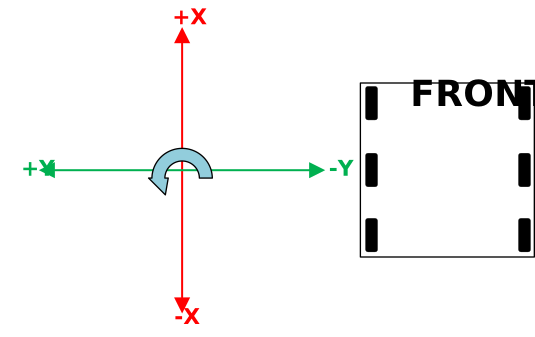
The WPILib robot coordinate system. Image source: WPILib.
You can learn more from the WPILib coordinate-system guide.
Odometry and Vision Pose Estimation
The drivetrain can estimate its position using wheel encoders and a gyro. This is called odometry.
Odometry is like walking with your eyes closed while counting your steps. It works well at first, but every small mistake gets added to the next one. Wheels can slip, the robot can be pushed, and sensors are never perfect. After enough driving, the estimated position slowly moves away from the robot's real position. This is called drift.
Watch how odometry drift accumulates over time
Therefore, the estimated position can become inaccurate if the robot relies only on wheel encoders and a gyro for pose estimation. The Limelight gives the robot another way to check its position. When it sees a known AprilTag, it can create a relatively accurate vision pose. So, a WPILib pose estimator combines both sources:
- odometry gives fast and smooth updates;
- vision helps correct accumulated drift.
The camera should not replace odometry. They work better together.
AprilTags
An AprilTag looks a little like a QR code. Each tag has a unique ID, and the official field map stores the exact position of every tag.

AprilTags detected on small robots. Image source: WPILib.
If the Limelight knows:
- which tag it sees;
- where that tag is on the field; and
- where the camera is mounted on the robot;
then it can work backwards and estimate where the robot is.
MegaTag and MegaTag2
A single tag can sometimes produce a shaky or flipped position. MegaTag improves the result by combining information from all visible AprilTags instead of treating each tag as a completely separate answer.
MegaTag2 also uses the robot's gyro heading. Giving it the direction that the robot is facing removes much of the guessing from the camera calculation, so it can provide a useful pose even when only one tag is visible.
Before using MegaTag2, make sure:
- the current season's field map is uploaded to the Limelight;
- the Limelight's position on the robot is configured correctly; and
- your code sends the robot's current heading to the Limelight every loop.
The basic Java flow looks like this:
// Tell MegaTag2 which direction the robot is facing.
LimelightHelpers.SetRobotOrientation(
    "limelight",
    gyro.getRotation2d().getDegrees(),
    0, 0, 0, 0, 0
);

// Ask Limelight for its newest robot pose.
LimelightHelpers.PoseEstimate visionEstimate =
    LimelightHelpers.getBotPoseEstimate_wpiBlue_MegaTag2("limelight");

// Only add a measurement when a tag was actually seen.
if (visionEstimate.tagCount > 0) {
    poseEstimator.addVisionMeasurement(
        visionEstimate.pose,
        visionEstimate.timestampSeconds
    );
}
This is the main job of a vision subsystem: get the newest camera result, reject results that are obviously unusable, and pass good measurements to the drivetrain's pose estimator.
Do not trust every camera result automatically. Reject a result if no tags (or less than two tags, if you want a more accurate result) were seen, and consider rejecting it while the robot is spinning extremely quickly.
Read the MegaTag2 guide and Limelight APIs before programming a Limelight.
Additional Resources
This page gives you the overall idea. Limelight adds new features and settings over time, so use the official Limelight documentation when setting up real hardware.